# Online Payments
import { Aside, Steps } from '@astrojs/starlight/components';
import Image from '@components/content/Image.astro';
Online payments form an integral part of the SumUp product portfolio. SumUp supports online payments through multiple approaches to address every merchant use case. Use one of the out-of-the-box integrations or build a complete custom payments flow with the APIs. Your app communicates with SumUp via HTTP requests defined in the [API Reference](/api).
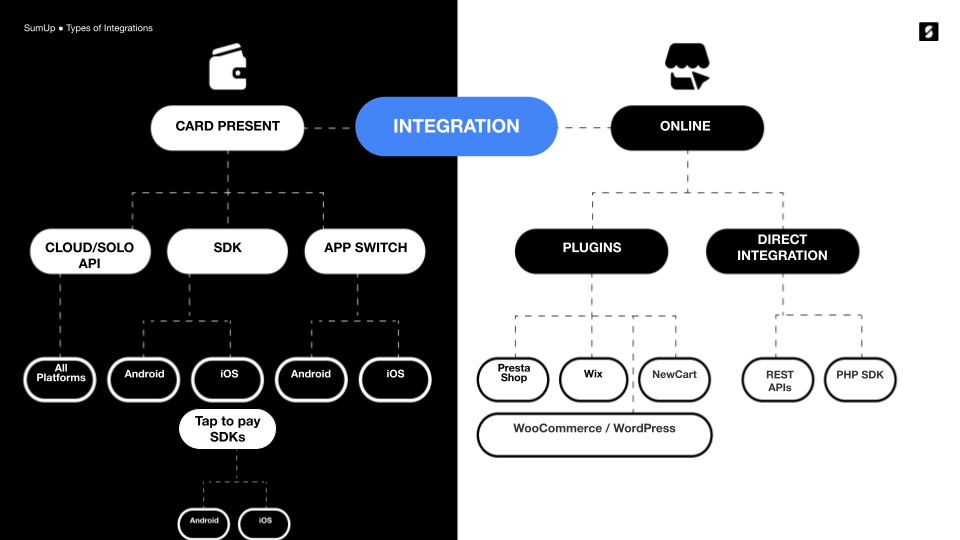
To get started, review the options SumUp offers for managing online payments.
## Getting a Sandbox Merchant Account
To test SumUp APIs and tools without involving real money, use a sandbox merchant account. Create one from your Dashboard account as follows.
1. Log in to your SumUp account.
2. Open the drop-down menu between **Support** and your user panel.
3. Select **Sandbox Merchant Account**. Your merchant account is now in sandbox mode.
With your sandbox merchant account, begin making API calls with real data. Sandbox merchant accounts **do not** process transactions with real funds. The sandbox merchant account has a different ID and displays a clear warning. Requests with a value of 11 (in any currency) always fail by design, to test failed transaction scenarios.
When finished experimenting with the sandbox merchant account, switch back to a regular account for business purposes.
## Authorization
All online payment products use SumUp APIs, which require authorization via an API key or access token. See the [Authorization Guide](/tools/authorization/) for details on available options.
## Checkout Products
SumUp provides a range of checkout products for seamless integration with your website.
### SumUp Card Widget
For a quick and seamless integration, we've developed a sleek payment widget. Incorporating the [SumUp Card Widget](/online-payments/checkouts/card-widget/) only requires adding a single script to your payment page!
#### Alternative Payment Methods
The Card Widget supports [Alternative Payment Methods](/online-payments/apm) (APMs) to accept payments beyond traditional card schemes (Visa or Mastercard). Access APMs through the [SumUp Card Widget](/online-payments/checkouts/card-widget/) by contacting us via the [contact form](/contact).
Available APMs include:
- Apple Pay
- Bancontact
- Blik
- Boleto
- EPS
- Google Pay
- iDeal
- MyBank
- PIX
- Przelewy24
- Satispay
### SumUp Swift Checkout SDK
The Swift Checkout SDK provides a complete and fast checkout experience to your end users, collecting payment, address, and contact information with a click of a button.
See the [Swift Checkout Documentation](/online-payments/checkouts/swift-checkout/) for details.
## Plugins
For Prestashop, Wix, or WooCommerce, use SumUp plugins for seamless payments. See the [Plugins section](/online-payments/plugins/) for details on each.
## Custom Integrations
### SumUp APIs
SumUp provides REST APIs for services such as creating and executing payments, storing cards, and issuing refunds. SumUp APIs use API keys or [OAuth 2.0](http://tools.ietf.org/html/rfc6749) for authentication. They also support Cross-Origin Resource Sharing (CORS) for secure browser access from different domains.
The API handles requests and responses primarily in JSON format, except when requests contain form-encoded data. Typically, requests consist of name/value pairs sent to SumUp API URI: `api.sumup.com`.
### Receiving Payments
To receive payments, [create a checkout](/online-payments/guides/single-payment/#1-create-a-checkout). Use merchant-direct payments or initiate on a merchant's behalf based on your [authorization type](/tools/authorization/). Checkouts are created via server-to-server communication to keep access tokens and credentials secret and prevent changes to sensitive details like transaction amount or recipient.
[Completing checkouts](/online-payments/guides/single-payment/#2-complete-a-checkout) via web browser or mobile app to avoid handling sensitive data like card details on your servers, eliminating PCI DSS compliance needs.
SumUp offers the following checkout completion options:
- You could build a [custom card form](/online-payments/guides/single-payment/#2-complete-a-checkout) that you must submit to the SumUp servers for processing
- You could use the [SumUp Card Widget](/online-payments/checkouts/card-widget/)
- You could process payments with [Alternative Payment Methods](/online-payments/apm), like Boleto, Bancontact & iDeal
- You could process [recurring payments](/online-payments/guides/tokenization-with-payment-sdk)
Successful checkout completion processes payment to the merchant's SumUp account.
## Contact SumUp